Python 组合数据类型(容器类型)
序列类型
三种基本序列类型:列表(list)、元组(tuple)、range 对象。除此之外 python 还有专为处理二进制数据(bytes)和文本字符串(str)的序列类型。
- 序列类型包括可变类型(列表等)和不可变类型(字符串、元组等)
- 不可变序列类型普遍实现而可变序列类型未实现的唯一操作就是对
hash()内置函数的支持。
序列类型中的可变与不可变即序列元素可否增删替换,若可以则为可变数据类型,反之为不可变类型,这在底层体现在是否允许对象被原地操作
1、通用序列操作
下表按照序列操作的优先级升序排列,其中:
- s 和 t 是相同类型的序列,n, i, j 和 k 是整数而 x 是序列元素
in和not in操作具有与比较操作相同的优先级+(拼接) 和*(重复) 操作具有与对应数值运算相同的优先级
| 运算 | 结果: |
|---|---|
x in s | 如果 s 中的某项等于 x 则结果为 True,否则为 False |
x not in s | 如果 s 中的某项等于 x 则结果为 False,否则为 True |
s + t | s 与 t 相拼接 |
s * n 或 n * s | 相当于 s 与自身进行 n 次拼接 |
s[i] | s 的第 i 项,起始为 0 |
s[i:j] | s 从 i 到 j 的切片 |
s[i:j:k] | s 从 i 到 j 步长为 k 的切片 |
len(s) | s 的长度 |
min(s) | s 的最小项 |
max(s) | s 的最大项 |
s.index(x[, i[, j]]) | x 在 s 中首次出现项的索引号(索引号在 i 或其后且在 j 之前) |
s.count(x) | x 在 s 中出现的总次数 |
- 虽然
in和not in操作在通常情况下,被用于简单的成员检测
>>> "ya" in "pitaya"
True
>>> "K" in "Karene"
True
>>> "a" in ["b",5,[2,"4"]]
False- 小于
0的 n 值会被当作0来处理 (生成一个与 s 同类型的空序列)。
>>> list1 = []
>>> list1
[]
>>> list2 = [[]]
>>> list2
[[]]*常用于序列的 “拷贝” ,但请注意 s 中的项并不会真的被拷贝;而是被多次引用。因此当原序列的元素发生改变时,引用该序列的序列也会发生相应改变
>>> lists = [[]] * 3
>>> lists
[[], [], []]
>>> lists[0]
[]
>>> lists[0].append(3)
>>> lists[0]
[3]
>>> lists[1]
[3]
>>> lists
[[3], [3], [3]]
同理,对于可变序列类型(如 list),简单将一个序列赋值给另一个序列不会产生新的序列对象,仅仅只是对原序列的引用
>>> list1 = ["Karene","and",19]
>>> list2 = list1
>>> list1[1] = "or"
>>> list1
["Karene","or",19]
>>> list2
["Karene","or",19]- 切片和索引
[i],[j:k],[i:j:k],由于序列类型元素的有序性,因此我们可以通过序号对元素进行索引和切片操作 (以字符串为例)
 +---+---+---+---+---+---+
 | P | y | t | h | o | n |
 +---+---+---+---+---+---+
 0   1   2   3   4   5   6
-6  -5  -4  -3  -2  -1

>>> str1 = "python"
>>> str1[0]
'p'
>>> str1[1:5]
'ytho'
>>> str1[:-2]
'pyth'
>>> str1[0:5:2]
'pto'- range 对象仅支持遵循特定模式的项序列,因此并不支持序列拼接和重复,即不支持
s + t,s * n或n * s
2、可变序列类型操作
下表的操作对可变序列类型有效:
- 表格中的 s 是可变序列类型
- t 是任意可迭代对象(简而言之就是可以通过 for … in … 这类语句遍历读取数的对象称之为可迭代对象:字符串、列表、元组等)
- x 是可变序列类型中的元素
| 运算 | 结果: |
|---|---|
s[i] = x | 将 s 的第 i 项替换为 x |
s[i:j] = t | 将 s 从 i 到 j 的切片替换为可迭代对象 t 的内容 |
del s[i:j] | 等同于 s[i:j] = [] |
s[i:j:k] = t | 将 s[i:j:k] 的元素替换为 t 的元素 |
del s[i:j:k] | 从列表中移除 s[i:j:k] 的元素 |
s.append(x) | 将 x 添加到序列的末尾 (等同于 s[len(s):len(s)] = [x]) |
s.clear() | 从 s 中移除所有项 (等同于 del s[:]) |
s.copy() | 创建 s 的浅拷贝 (等同于 s[:]) |
s.extend(t) 或 s += t | 用 t 的内容扩展 s (基本上等同于 s[len(s):len(s)] = t) |
s *= n | 使用 s 的内容重复 n 次来对其进行更新 |
s.insert(i, x) | 在由 i 给出的索引位置将 x 插入 s (等同于 s[i:i] = [x]) |
s.pop() 或 s.pop(i) | 提取在 i 位置上的项,并将其从 s 中移除 |
s.remove(x) | 删除 s 中第一个 s[i] 等于 x 的项目。 |
s.reverse() | 就地将列表中的元素逆序。 |
s[i:j:k] = t中t必须与它所替换的切片具有相同的长度。
>>> list1 = ["Karene","pitaya",19,20,21]
>>> list1[0::2]=[1,2,3]
>>> list1
[1,"pitaya",2,20,3]
>>> list1[1:-1:2] = [1]
Traceback (most recent call last):
  File "<pyshell#160>", line 1, in <module>
    list1[1:-1:2] = [1]
ValueError: attempt to assign sequence of size 1 to extended slice of size 2
但是在 s[i:j] = t 中则不会,在 s[i:j] = t 操作中,若 t 过长或者过短,序列会自动增长或缩短
>>> list1 = ["Karene","pitaya",19,20,21]
>>> list1[0:3] = [1,2,3,4,5,6]
>>> list1
[1, 2, 3, 4, 5, 6, 20, 21]
>>> list1[0:5] = ["Karene","pitaya"]
>>> list1
['Karene', 'pitaya', 6, 20, 21]s.pop()或s.pop(i)中可选参数i默认为-1,因此在默认情况下会移除并返回最后一项。
>>> list1 = ["Karene","pitaya",19,20,21]
>>> list1.pop()
21
>>> list1.pop(-1)
20
>>>list1
['Karene', 'pitaya', 19]- 当在 s 中找不到 x 时
remove()操作会引发ValueError(接受值异常错误)
>>> list1 = ["Karene",19,"pitaya",19,20,21]
>>> list1.remove(19)
>>> list1
['Karene', 'pitaya', 19, 20, 21]
>>> list1.remove(18)
Traceback (most recent call last):
  File "<pyshell#178>", line 1, in <module>
    list1.remove(18)
ValueError: list.remove(x): x not in list- 对于可变序列类型(如
list),简单将一个序列赋值给另一个序列不会产生新的序列对象,仅仅只是对原序列的引用
>>> list1 = ["Karene","and",19]
>>> list2 = list1
>>> list1[1] = "or"
>>> list1
["Karene","or",19]
>>> list2
["Karene","or",19]
>>> del list1[0]
>>> list1
["or",19]
>>> list2
["or",19]
>>> list2.append("Karene")   # 反过来对list2的任何操作也会同步影响list1
>>> list1
["or",19,"Karene"]
而如果需要将序列真正的拷贝而不只是引用则需要用到 s.copy() 实现
>>> list1 = ["Karene","and",19]
>>> list2 = list1.copy()
>>> list1[1] = "or"
>>> list1
["Karene","or",19]
>>> list2
["Karene","and",19]s.copy(),本质上就相当于 s[:]
>>> list1 = ["Karene","and",19]
>>> list2 = list1[:]
>>> list1[1] = "or"
>>> list1
["Karene","or",19]
>>> list2
["Karene","and",19]
s.clear() 只要出现,接下来的 序列s 就是空序列
>>> list1 = ["Karene","pitaya",19]
>>> list2 = list1.clear()
>>> list2 #上一步的赋值无效
>>> list1
[]
元组
元组是不可变序列类型,一旦创建就不能被修改,元组元素之间用 , 隔开,所有元素用 () 包含(可选)。元组可以存储数字、字符串、列表、元组等任何类型的数据,并且在同一个元组中,元素的类型可以不同,元素的个数没有限制。常用于
- 表达固定数据项
>>> tuple1 = "Karene", [2,3,"pitaya"], 19
>>> tuple2 = ("Karene", [2,3,"pitaya"], 19)
>>> tuple1
('Karene', [2, 3, 'pitaya'], 19)
>>> tuple2
('Karene', [2, 3, 'pitaya'], 19)- 接收函数多返回值
>>> def func(x):
    return x, x**3
>>> func(2)
(2, 8)
>>> type(func(2))
<class 'tuple'>- 多变量同步赋值
>>> a, b = "Karene","pitaya"
>>> a, b = (b, a)
>>> a
'pitaya'
>>> b
'Karene'
>>> type((b, a))
<class 'tuple'>- 循环遍历(可迭代对象)
>>> for i, j in ((1,2),(3,4),(5,6)):
        print(i+j)
    3,7,11,
创建元组的方法
- 使用
,直接创建
>>> tuple1 = "Karene","pitaya",19
>>> tuple2 = ("Karene","pitaya",19)
>#创建空元组
>>> tuple3 = ()
#请注意,创建单元组记得加 ",",否则会被视为其他类型
>>> tuple4 = "Karene",
>>> tuple5 = ("Karene",)
>>> tuple6 = ("Karene")
>>> type(tuple6)
<class 'str'>- 使用构造器
tuple()
tuple(data)其中:>>> str1 = "Karene" # 字符串
>>> lists = [19,20,21] # 列表
>>> ranges = range(1, 7, 2) # range 对象
>>> tuple(str1) # 请注意将字符串转换为元组时,字符串会被拆分
('K', 'a', 'r', 'e', 'n', 'e')
>>> tuple(lists) # 将列表转换为元组
(19, 20, 21)
>>> tuple(ranges) # 将 range 区间转换为元组
(1, 3, 5)
>>> tuple() # 空元组
()-
tuple():tuple() 内置函数可以将其它数据类型转换为元组类型。 -
data:表示可以转化为元组的数据(字符串、元组、range 对象等)。
元组实现了所有通用序列的操作。
>>> tuple1 = (1,2,3)
>>> tuple2 = tuple("karene")

>>> 1 in tuple1   # 判定成员关系
True
>>> tuple3 = tuple1 + tuple2   # 同类型序列拼接
>>> tuple3
(1, 2, 3, 'k', 'a', 'r', 'e', 'n', 'e')
>>> tuple2[1]   # 索引
'a'
>>> tuple2[1:5]   # 切片
('a', 'r', 'e', 'n')
>>> tuple2[1:5:2]   # 跨步切片
('a', 'e')
>>> len(tuple1)   # 求长
3
>>> min(tuple1)   # 求最小值
1
>>> max(tuple1)   # 求最大值
3
>>> tuple3.index("e",2,)   # "e"在2后出现的序列号
6
>>> tuple3.count("e")   # "e"出现的总次数
2
注意几点特殊情况
min()和max(),这两个函数不仅仅用于比较纯数字或者可迭代对象,甚至可以用来比较多个可迭代对象或者映射类型,可参照 Python 内置函数(43)——min、Python 内置函数-min 函数和 max 函数-详解、Python min() 函数 这三篇博文详解,以下是摘抄片段
>>> min(1)    # 传入1个参数报错
Traceback (most recent call last):
  File "<pyshell#0>", line 1, in <module>
    min(1)
TypeError: 'int' object is not iterable
>>> min(1,2)                # 传入2个参数 取2个中较小者
1
>>> min(1,2,3)              # 传入3个参数 取3个中较小者
1
>>> min('1234')             # 传入1个可迭代对象,取其最小元素值
'1'
>>> min('a','b')            # 取排序靠前者
'a'
>>> min('ab','ac','ad')     # 依次按索引比较取较小者
'ab'
>>> min(-1, -2)              # 数值默认去数值较小者
-2
>>> min(-1, -2, key = abs)    # 传入了求绝对值函数,则参数都会进行求绝对值后再取较小者
-1
# 当传入多个元组、列表、字符串时,从左到右按照索引序号逐一比较,直到比出胜负
>>> print(min([1, 2], [2, 0, 89]))
 [1, 2]
>>> print(min((5, 8), (5, 1, 9)))
 (5, 1, 9)
>>> print(min('asfefreg', 'asfee'))
asfee
>>> min(1, 2, '3')             # 数值和字符串不能取最小值
Traceback (most recent call last):
  File "<pyshell#22>", line 1, in <module>
    min(1, 2, '3')
TypeError: unorderable types: str() < int()
>>> min(1, 2, '3', key = int)   # 指定key为转换函数后,可以取最小值
1

>>> min([1, 2], (1, 1))         # 元组和列表不能取最小值
Traceback (most recent call last):
  File "<pyshell#24>", line 1, in <module>
    min([1, 2], (1, 1))
TypeError: unorderable types: tuple() < list()
>>> min([1, 2], (1 ,1), key = lambda x:x[1])
# 指定key为返回序列索引1位置的元素后,可以取最小值
(1, 1)- 关于不可变元组的可变性讨论材料来源于 菜鸟 python 元组一节的讨论区
>>> #1、当元组的元素中出现可变序列类型时,元组可变?
>>> tuple1 = ("Karene", 19, [1, 2, 3])
>>> tuple1[2][1] = 5
>>> tuple1
 ("Karene",19,[1, 5, 3])

>>> #2、修改元组内的特定位置的值
>>> tuple1 = (1, 2, 3)
>>> list1 = list(t1)
>>> list1[0] = 0
>>> tuple1 = tuple(list1)
>>> tuple1
 (0, 2, 3)

>>> #3、通过间接方法修改元组
>>> tuple1 = (1,2,4,5)
>>> tuple1 = tuple1[:2] + (3,) + tuple1[2:]
>>> tuple1
 (1, 2, 3, 4, 5)
以下摘自 python3.11.1 文档:
- 对象 是 Python 中对数据的抽象。 Python 程序中的所有数据都是由对象或对象间关系来表示的。每个对象都有各自的标识号、类型和值。一个对象被创建后,它的标识号就绝不会改变;你可以将其理解为该对象在内存中的地址。
is运算符可以比较两个对象的标识号是否相同;id()函数能返回一个代表其标识号的整数。 在 CPython 中,id(x)就是存放x的内存的地址。 - 一个对象的哈希值如果在其生命周期内绝不改变,就被称为 可哈希 (它需要具有
__hash__()方法),并可以同其他对象进行比较(它需要具有__eq__()方法)。可哈希对象必须具有相同的哈希值比较结果才会相同。 可哈希性使得对象能够作为字典键或集合成员使用,因为这些数据结构要在内部使用哈希值。 - 大多数 Python 中的不可变内置对象都是可哈希的;可变容器(例如列表或字典)都不可哈希;不可变容器(例如元组和 frozenset)仅当它们的元素均为可哈希时才是可哈希的。 用户定义类的实例对象默认是可哈希的。 它们在比较时一定不相同(除非是与自己比较),它们的哈希值的生成是基于它们的
id()。 - 不可变序列类型普遍实现而可变序列类型未实现的唯一操作就是对
hash()内置函数的支持。尝试对包含有不可哈希值的不可变序列进行哈希运算将会导致TypeError。
我的理解是:元组的可变性取决于其元素的可哈希性,只有在元素全为可哈希对象时才为不可变序列类型,而在一般情况下,普通数据类型(如 int,float,complex,str 等)均可哈希,因此大多数情况下元组都是可哈希即不可变。以下代码通过 hash() 和监视对象 id 证明:
>>> tuple1 = ("karene",1,2,3,4)
>>> id(tuple1)
1561156447472    # 第一次创建tuple1,为其分配的内存地址
>>> tuple2 = (12,["Karene",23])
>>> id(tuple2)
1561163172288    # 第一次创建tuple2,为其分配的内存地址

>>> lists = list(tuple1)
>>> lists[0] = 0
>>> tuple1 = tuple(lists)   # 赋值生效时已经创建了新的元组,自然为其分配新地址
>>> id(tuple1)
1561157801584    # 此时的tuple1从头到尾以及与只之前的tuple1毫无瓜葛
>>> tuple2[1][0] = [0,1]    # 这一步仅仅是对可变类型容器内部操作
>>> id(tuple2)
1561163172288   # 此时的tuple2还是从前那个tuple2

>>> hash(tuple1)   # 同样都是元组,tuple1可哈希为不可变类型
-1433138295412917233
>>> hash(tuple2)   # 同样都是元组,tuple2不可哈希为可变类型
Traceback (most recent call last):
File "<pyshell#115>", line 1, in <module>
  hash(tuple2)
TypeError: unhashable type: 'list'
结论:当元组内有列表、字典这种可变容器类型时,元组为可变类型;其他时候不可变
戳 【Python】元组之不可修改性详解 同样可证
列表
Summary
列表 (list) 是包含 0 个或多个对象引用的有序序列,属于可变容器类型。与元组不同,列表的长度和内容都可变,可自由增删替换元素,没有长度限制,元素类型可以不同。
——摘自:python 程序设计基础 (第二版) 嵩天等著
列表的创建
# 使用一对方括号表示空列表
>>> list1 = []
>>> print(type(list1),list1)
<class 'list'> []
# 单元素列表既可以用[1]表示,也可以在末尾加","[1,], 请注意,单元素元组的创建必须加"," (1,)
>>> list2 = [1]
>>> list3 = [1,]
>>> print(list2,list3)
[1] [1]
# 普通列表也可以在末尾加"," 可以但是没有必要
>>> list4 = [1,2,[1,3],(4,)]
>>> list5 = [1,2,[1,3],(4,),]
[1, 2, [1, 3], (4,)] [1, 2, [1, 3], (4,)]
# 使用列表推导式创建
>>> list6 = [i+1 for i in range(1,10,2)]
>>> list6
[2, 4, 6, 8, 10]
# 使用构造器list()创建
>>> list7 = list(range(1,20,4))
>>> list7
[1, 5, 9, 13, 17]- 列表推导式:
[x for x in iterable]翻译一下就是:[表达式 for 迭代变量 in 可迭代对象],可以对比for…in…循环体
表达式 for 迭代变量 in 可迭代对象 [if 条件1 else 结果]>>> literable = range(1,20,4)
>>> list1 = [i for i in literable]
>>> list1
[1, 5, 9, 13, 17]
>>> list2 = [i**2 for i in literable]
>>> list2
[1, 25, 81, 169, 289]推导式可以加 if 条件语句,也可以嵌套创建多元列表,更多用法参见 列表推导式
-
list()构造器:list()或list(iterable),将可迭代对象转换为列表 -
与列表创建相关的还有
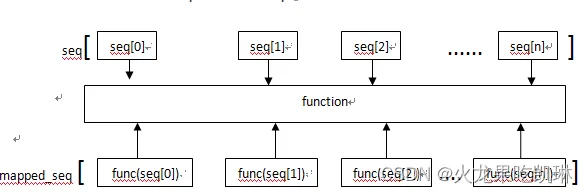
map()用的多:map(): 根据提供的函数对指定序列做映射
map(function, iterable, ...)当序列只有一个时,将函数 func 作用于这个序列的每个元素上,从而得到一个新的序列。
# 把list的每个元素都作平方
>>> list1 = [1, 2, 3, 4, 5, 6, 7, 8, 9]
>>> def f(x):
       return x**2
# 注意:
# 在python2.x版本里,map()会直接返回新list列表;
# 在python3.x版本里面,map()的返回值是iterators, 而不是list,直接使用map()返回的是一个map对象
>>> print(map(f, list1))
<map object at 0x000001B91090F6D0>
>>>id(map(f, list1))
1894358513360

# 所以需要使用一个list()构造器将map对象转为list列表
>>> print(list(map(f, list1)))
[1, 4, 9, 16, 25, 36, 49, 64, 81]

# 规范英文首字母大写
>>> list1 = ['adam', 'LISA', 'barT']
>>> def format_name(s):
        s1=s[0:1].upper()+s[1:].lower()
        return s1
>>> print(list(map(format_name, list1)))

# 获取多个变量,同时赋值
>>> x, y, z = map(int, input('请输入一个三维坐标:').split())
>>> 请输入一个三维坐标:1 2 3
>>> print(x, y, z)
1 2 3当序列多于一个时,map() 可以并行(注意是并行)地对每个序列执行函数 func
# 下例部分摘抄自参考文
>>> list1 = list(map(lambda x,y:x**y,[1,2,3],[1,2,3]))
>>> for i in list1:
        print(i)

1
4
27

# python3中可以处理类表长度不一致的情况,但无法处理类型不一致的情况,
>>> l4 = list(map(lambda x,y:(x**y,x+y),[1,2,3],[1,2]))
>>> for i in l4:
        print(i)

(1, 2)
(4, 4)

>>> l4 = list(map(lambda x,y:(x**y,x+y),[1,2,3],[1,2,'a']))
TypeError: unsupported operand type(s) for ** or pow(): 'int' and 'str' 有兴趣可以看下这两篇:python 中 map 的基本用法示例 map()函数
列表的方法
列表实现了所有的通用序列操作和可变序列操作。额外还提供了一个 sort() 方法。
sort(*, key=None, reverse=False)- key 指定带有一个参数的函数,用于从每个列表元素中提取比较键 (例如
key=str.lower)。 - reverse 为一个布尔值。 如果设为
True,则每个列表元素将按反向顺序比较进行排序。
此方法会对列表进行原地排序,只使用 < 来进行各项间比较。异常不会被屏蔽,如果有任何比较操作失败,整个排序操作将失败(而列表可能会处于被部分修改的状态)。
>>> list1 = [["1","2"], ("p","i"), "Karene"]
>>> list1.sort(key = lambda lists: lists[1], reverse = True)
>>> list1
[('p', 'i'), 'karene', ['1', '2']]
# 比较的是序列的第二个元素Unicode码值,lambda函数用来指定比较第二个元素。
灵活的列表
列表支持任意长度和混合数据类型,操作和方法丰富。需要组合数据类型管理批量数据时,优先考虑列表。
字符串
字符串是由 Unicode 码位构成的不可变序列,用于处理文本数据。
创建字符串
- 单引号:
'允许包含有 "双" 引号'
>>> name = 'Karene "frist name"'
>>> name
'Karene "frist name"'- 双引号:
"允许嵌入 '单' 引号"
>>> name = "Karene 'frist name'"
>>> name
"Karene 'frist name'"- 三重引号:
'''三重单引号''',"""三重双引号"""通常用于多行文本(保留格式,比如换行)
>>> txt = """
Some of us get dipped in flat
, some in satin, some in
gloss. But every once in a
while youfind someone who's
iridescent, and when you do
, nothing will ever compare.
有人住高楼,有人在深沟,
有人光万丈,有人一身锈,
世人万千种,浮云莫去求,
斯人若彩虹,遇上方知有。
"""
>>> txt   # \n 为换行转义符
"\nSome of us get dipped in flat\n, some in satin, some in\ngloss. But every once in a\nwhile youfind someone who's\niridescent, and when you do\n, nothing will ever compare.\n有人住高楼,有人在深沟,\n有人光万丈,有人一身锈,\n世人万千种,浮云莫去求,\n斯人若彩虹,遇上方知有。\n"
>>> print(txt)   # print()会解析转义符

Some of us get dipped in flat
, some in satin, some in
gloss. But every once in a
while youfind someone who's
iridescent, and when you do
, nothing will ever compare.
有人住高楼,有人在深沟,
有人光万丈,有人一身锈,
世人万千种,浮云莫去求,
斯人若彩虹,遇上方知有。- 字符串也可以通过使用
str构造器从其他对象创建。
>>> values = 123456789
>>> nums = str(values)
>>> nums
'123456789'作为单一表达式组成部分,之间只由空格分隔的多个字符串字面值会被隐式地转换为单个字符串字面值。也就是说,("spam " "eggs") == "spam eggs"。
字符串的方法
字符串实现了所有通用序列的操作,除此之外,还额外提供了很多方法。下表列出部分
str.lower() | 返回 str 的副本,全部字符小写 |
|---|---|
str.upper() | 返回 str 的副本,全部字符大写 |
str.split(sep=None,maxsplit=-1) | 返回一个列表,由 str 根据 sep 被分隔的部分构成 |
str.join(iterable) | 返回一个由 iterable 中的字符串拼接而成的字符串 |
str.count(sub[, start[, end]]) | 返回子字符串 sub 在 [start, end] 范围内非重叠出现的次数。 |
str.find(sub[, start[, end]]) | 返回子字符串 sub 在 s[start:end] 切片内被找到的最小索引。 |
str.isupper() | 如果字符串中有大写字符返回 True,否则返回 False |
str.isalnum() | 如果字符串中的所有字符都是字母或数字且至少有一个字符,则返回 True,否则返回 False |
str.format(args, kwargs) | 返回一种字符串的格式化排版 |
>>> name = "Karene Pitaya"
>>> name.lower()
'karene pitaya'
>>> name.upper()
'KARENE PITAYA'
>>> name.split()
['Karene', 'Pitaya']
>>> name.join(["Sheep","Y"])
'SheepKarene PitayaY'
>>> name
'Karene Pitaya'
>>> name.isalnum()
False
>>> name.find('e',2,6)   # 相当于在name[2:6]中寻找第一个序号
3
>>> name.count('a',2,6)   # 相当于在name[2:6]中计次
0
>>> "{} is the best".format('python')   #格式化输出
'python is the best'
字符串格式化
以下是简单的概括,详细可参照这篇:python 字符串格式化深入详解(四种方法) python-fstring-format-spec
%格式化,一种类似 C 语言printf()风格的方法
# 用%占位符表示字符串
>>> hello = "hello,Karene"
>>> print("%s" % hello)   # %s采用str()的显示字符串,经print()后直接输出
hello,Karene
>>> print("%r" % hello)   # %r采用repr()的显示字符串,但是经print()后会显示转义符和引号
'hello,Karene'
>>> print("%c" % 42836)   # %c表示字符,输出Unicode码值对应字符, 类似于chr()
Ꝕ
>>> num = 1234
>>> print("十进制:%d\nUnicode字符:%c\n十进制:%i\n十六进制:%x\n八进制:%o\n小数:%f" % (num,num,num,num,num,num))
十进制:1234
Unicode字符:Ӓ
十进制:1234
十六进制:4d2
八进制:2322
小数:1234.000000

# 下面是更细节的一些格式化操作
%[(name)][flags][width].[precision] typecode   # []表示可选
# (name):变量名
# flags:可以为+\-\''\0, +表示右对齐\-表示左对齐\''即用空格填充\0表示用0填充,与宽度联动
# width:宽度即整个格式化对象表示的长度,要是字符太长而给的宽度太窄也不会被截断,会按原字符表示
# .[precision]:精度,即小数点后的位数!!!注意有个小数点
# typecode:s\r\d\o\f\c等

>>> print("十进制:%+8d\nUnicode字符:%c+8\n十进制:%+8i\n十六进制:%+6x\n八进制:%+8o\n小数:%+10.2f" % (num,num,num,num,num,num))
十进制:   +1234
Unicode字符:Ӓ+8
十进制:   +1234
十六进制:  +4d2
八进制:   +2322
小数:  +1234.00
>>> print("十进制:%(num)+8d\nUnicode字符:%(num)c+8\n十进制:%(num)+8i\n十六进制:%(num)+6x\n八进制:%(num)+8o\n小数:%(num)+10.2f" % {"num": num})
十进制:   +1234
Unicode字符:Ӓ+8
十进制:   +1234
十六进制:  +4d2
八进制:   +2322
小数:  +1234.00
还有些复杂的用法结合容器使用
>>> students = [{"name":"Wilber", "age":27}, {"name":"Will", "age":28}, {"name":"June", "age":27}]
>>> print ("name: %8s\nage: %9d" % (students[0]["name"], students[0]["age"]))
name:   Wilber
age:        27
>>> print ("name: %8s\nage: %9d" % (students[1]["name"], students[1]["age"]))
name:     Will
age:        28
>>> print ("name: %8s\nage: %9d" % (students[2]["name"], students[2]["age"]))
name:     June
age:        27
>>> for student in students:
        print "%(name)s is %(age)d years old" %student
Wilber is 27 years old
Will is 28 years old
June is 27 years oldstr.format()方法
# {<序号>:<操作符>},其中,操作符按顺序包括了<填充><对齐><宽度><,><.精度><类型>,详见上图
>>> name = 'Karene'
>>> age = 16
>>> height = 158.6
>>> weight = 46.2
>>> print('my name is           {0:->8}\nmy age is            {1:|<8d}\nmy weight is {3:*^16.2f}\nmy height is {2:->16.4f}'.format(name,age,height,weight))
my name is           --Karene
my age is            16||||||
my weight is *****46.20******
my height is --------158.6000
print() 与 input()
python 中最常见的输出和输入字符串的内置函数,见 python-simple-io
集合类型(集合)
集合的创建
# 1、赋值语句生成集合
>>> set1 = {"Karene", 158.6, 16}
>>> print(type(set1), set1)
<class 'set'> {16, 'Karene', 158.6}

# 2、集合推导式, 这里的可迭代对象应该为不可变类型
>>> set2 = {c for c in 'Karene' if c not in 'e'}
>>> print(type(set2), set2)
<class 'set'> {'K', 'n', 'r', 'a'}

# 3、构造器set()
>>> set3 = set('Karene')
>>> print(type(set3), set3)
<class 'set'> {'n', 'K', 'a', 'r', 'e'}
集合的方法
# 1、成员检测:in \  not in |在返回 True,不在返回 Flase
>>> 's' in {'a','b','c'}
False
>>> 's' not in {'a','b','c'}
True
# 2、求长:len(s) |返回S元素个数
>>> len({'1', 'b', 2, 'c'})
4
# 3、添加项:S.add(elem) |将元素 elem 添加到S中
>>> S = {'1', 'b', 2, 'c'}
>>> S.add("abc")
>>> S
{'b', 2, 'abc', '1', 'c'}
# 4、移除项:S.remove(elem) |从集合中移除元素 elem。 如果 elem 不存在于集合中则会引发 KeyError。
>>> S.remove(2)
>>> S
{'b', 'abc', '1', 'c'}
# 5、移除项:S.discard(elem) |如果元素 elem 存在于集合中则将其移除。
>>> S.discard('1')
>>> S
{'b', 'abc', 'c'}
# 6、拷贝:S.copy() |返回原集合的浅拷贝,即非原集合的引用,不随原集合改变而改变。
>>> S1 = S.copy()
>>> S1
{'b', 'abc', 'c'}
>>> S.add(2)
>>> S
{'b', 2, 'abc', 'c'}
>>> S1
{'b', 'abc', 'c'}
# 7、提取元素:S.pop() |从集合中移除并返回任意一个元素。 如果集合为空则会引发 KeyError。
>>> S1.pop()
'b'
>>> S1
{'abc', 'c'}
# 8、清除:S.clear() |从集合中移除所有元素。
>>> S.clear()
>>> S
set()
# 9、比较相同:S.isdisjoint(other) |如果集合中没有与 other 共有的元素则返回 True。 当且仅当两个集合的交集为空集合时,两者为不相交集合。
>>> S1.isdisjoint(["c","d"])
False
>>> S1.isdisjoint("sadcd")
False
>>> S1.isdisjoint({"a","b"})
True
集合的数学操作符
# 1、生成一个差集:set - other 或 S.difference(*others)
# 2、更新为差集:set -= other 或 S.difference_update(*others)
# 3、生成一个交集:set & other 或 S.intersection(*others)
# 4、更新为交集:set &= other 或 S.intersection_update(*others)
# 5、生成一个并集:set | other 或 S.union(*others)
# 6、更新为并集:set |= other 或 S.update(*others)
# 7、生成一个补集:set ^ other 或 S.symmetric_difference
# 8、更新为补集:set ^= other 或 symmetric_difference_update(other)
# 9、判断是否为子集:set <= other 或 issubset(other)
# 10、判断是否为真子集:set < other
# 11、判断是否为超集:set >= other 或 issuperset(other)
# 12、判断是否为真超集:set > other
映射类型(字典)
字典:一种映射类型,“键 - 值对”数据项的组合,字典的每个元素都是一个键值对,元素无序。
字典的创建
# 使用花括号内以逗号分隔 `键: 值` 对的方式:
>>> friends = {"Jack":"boy", "Karene":"girl", "Happy":"boy"}

# 使用字典推导式:
>>> mine = {}
>>> print(type(mine), mine)
<class 'dict'> {}
>>> yours = {i:i**2 for i in range(1,20,4)}
>>> yours
{1: 1, 5: 25, 9: 81, 13: 169, 17: 289}

# 使用构造器dict():
>>> a = dict(one=1, two=2, three=3)
>>> b = {'one': 1, 'two': 2, 'three': 3}
>>> c = dict(zip(['one', 'two', 'three'], [1, 2, 3]))
>>> d = dict([('two', 2), ('one', 1), ('three', 3)])
>>> e = dict({'three': 3, 'one': 1, 'two': 2})
>>> f = dict({'one': 1, 'three': 3}, two=2)
>>> a == b == c == d == e == f
True
>>> a
{'one': 1, 'two': 2, 'three': 3}# 语法1、new_dictionary = {键:值 for 键, 值 in 可迭代对象 if 条件表达式}
>>> new_dict = {key:value for key, value in (("a",1),("b",2),("c",3),("d",4),("e",5),("f",6),("g",7)) if key in "aceg"}
>>> new_dict
{'a': 1, 'c': 3, 'e': 5, 'g': 7}
>>> dict1 = {i:j**2 for j, i in [(1,1),(2,2),(3,3),(4,4),(5,5),(6,6)] if i%2 == 0}
>>> dict1
{2: 4, 4: 16, 6: 36}
# 语法2、new_dictionary = {键:值1 if 条件表达式 else 值2 for 键, 值 in 可迭代对象}
>>> new_dict = {key:value if key in "aceg" else value**2 for key, value in (("a",1),("b",2),("c",3),("d",4),("e",5),("f",6),("g",7))}
>>> new_dict
{'a': 1, 'b': 4, 'c': 3, 'd': 16, 'e': 5, 'f': 36, 'g': 7}
>>> dict1 = {i:j+1 if i%2 == 0 else j-1 for j, i in [(1,1),(2,2),(3,3),(4,4),(5,5),(6,6)]}
>>> dict1
{1: 0, 2: 3, 3: 2, 4: 5, 5: 4, 6: 7}- 构造器
dict()
# 使用构造器创建字典
>>> dict1 = dict((('a',1),('c',3),('e',5),('g',7)))
>>> dict1
{'a': 1, 'c': 3, 'e': 5, 'g': 7}
>>> dict2 = dict([('1',0),('2',3),('3',2),['4',5],{'5',4},('6',7)])
>>> dict2
{'1': 0, '2': 3, '3': 2, '4': 5, '5': 4, '6': 7}不论是推导式还是在构造器,循环结构种的可迭代对象都有些要求:简单来说就是需要满足映射位置匹配
如果没有给出位置参数,将创建一个空字典。 如果给出一个位置参数并且其属于映射对象,将创建一个具有与映射对象相同键值对的字典。 否则的话,位置参数必须为一个 iterable 对象。 该可迭代对象中的每一项本身必须为一个刚好包含两个元素的可迭代对象。 每一项中的第一个对象将成为新字典的一个键,第二个对象将成为其对应的值。 如果一个键出现一次以上,该键的最后一个值将成为其在新字典中对应的值。
如果给出了关键字参数,则关键字参数及其值会被加入到基于位置参数创建的字典。 如果要加入的键已存在,来自关键字参数的值将替代来自位置参数的值。
字典的操作符
>>> dict1 = {i:j if i in '246' else j**2 for i,j in [('1',1),('2',2),('3',3),('4',4),('5',5),('6',6),('7',7)]}
>>> dict1
{'1': 1, '2': 2, '3': 9, '4': 4, '5': 25, '6': 6, '7': 49}
# 成员检测(对keys)in,not in |如果 d 中存在键 key 则返回 True,否则返回 False。
>>> print('1' in dict1, '15' not in dict1)
True True

# len(d) 求长 | 返回字典 d 中的项数。
>>> len(dict1)
7

# d[key] 提取键 | 返回 d 中以 key 为键的项。 如果映射中不存在 key 则会引发 KeyError。
>>> dict1['3']
9

# d[key] = value 更改值 | 将 d[key] 设为 value。若原字典中没有该键值对,则新增
>>> dict1['3'] = 10
>>> dict1
{'1': 1, '2': 2, '3': 10, '4': 4, '5': 25, '6': 6, '7': 49}
>>> dict1['8'] = 8   # 若原字典中没有该键值对,则新增
>>> dict1
{'1': 1, '2': 2, '3': 10, '4': 4, '5': 25, '6': 6, '7': 49, '8': 8}

# del d[key] 删除键值对 | 将 d[key] 从 d 中移除。 如果映射中不存在 key 则会引发 KeyError。
>>> del dict1['1']
>>> dict1
{'2': 2, '3': 10, '4': 4, '5': 25, '6': 6, '7': 49, '8': 8}

# list(d) 给键排序 | 返回字典 d 中使用的所有键的列表。
>>> dict1 = {'2': 2, '3': 10, '4': 4, '5': 25, '6': 6, '7': 49, '8': 8}
>>> list(dict1)
['2', '3', '4', '5', '6', '7', '8']


>>> dict3 = {'a':2, 'b':4, 'c':6}
>>> dict4 = {'1':1, '2':1, '3':1}   # 以下为python3.9新功能
# d | other  |合并 d 和 other 中的键和值来创建一个新的字典,两者必须都是字典。
>>> dict1 | dict3
{'2': 2, '3': 10, '4': 4, '5': 25, '6': 6, '7': 49, '8': 8, 'a': 2, 'b': 4, 'c': 6}
>>> dict1
{'2': 2, '3': 10, '4': 4, '5': 25, '6': 6, '7': 49, '8': 8}
>>> dict1 | dict4   # 当 d 和 other 有相同键时, other 的值优先。
{'2': 1, '3': 1, '4': 4, '5': 25, '6': 6, '7': 49, '8': 8, '1': 1}

# d |= other |用 other 的键和值更新字典 d, 两者必须都是字典。当 d 和 other 有相同键时,other 的值优先。
>>> dict1 |= dict3
>>> dict1
{'2': 2, '3': 10, '4': 4, '5': 25, '6': 6, '7': 49, '8': 8, 'a': 2, 'b': 4, 'c': 6}
>>> dict1 |= dict4
>>> dict1
{'2': 1, '3': 1, '4': 4, '5': 25, '6': 6, '7': 49, '8': 8, 'a': 2, 'b': 4, 'c': 6, '1': 1}

# iter(d) 返回以字典的键为元素的迭代器。 这是 iter(d.keys()) 的快捷方式。
# reversed(d) 返回一个逆序获取字典键的迭代器。 这是 reversed(d.keys()) 的快捷方式。
字典的方法
>>> dict1 = {i:j if i in '246' else j**2 for i,j in [('1',1),('2',2),('3',3),('4',4),('5',5),('6',6),('7',7)]}
>>> dict1
{'1': 1, '2': 2, '3': 9, '4': 4, '5': 25, '6': 6, '7': 49}

# D.clear() |移除字典中的所有元素。
# D.copy()  |返回原字典的浅拷贝,简单的赋值只是对原字典的引用

# D.popitem() |从字典中移除并返回一个 (键, 值) 对。 键值对会按 LIFO 的顺序被返回。
# FIFO:全称First in, First out,先进先出。LIFO:全称Last in, First out,后进先出。
>>> dict1.popitem()
('7', 49)
>>> dict1
{'1': 1, '2': 2, '3': 9, '4': 4, '5': 25, '6': 6}
# D.pop(key[, default]) |如果 key 存在于字典中则将其移除并返回其值,否则返回 default。
>>> dict1.pop('1')
1
>>> dict1
{'2': 2, '3': 9, '4': 4, '5': 25, '6': 6}
>>> dict1.pop('18',2)
2
>>> dict1.pop('18')   # 如果 default 未给出且 key 不存在于字典中,则会引发 KeyError。
Traceback (most recent call last):
  File "<pyshell#29>", line 1, in <module>
    dict1.pop('18')
KeyError: '18'

# D.fromkeys(iterable[, value]) | 创建等值字典,默认为None
>>> dict1.fromkeys(['as','al','df'])
{'as': None, 'al': None, 'df': None}
>>> dict1.fromkeys(['as','al','df'], 'same')
{'as': 'same', 'al': 'same', 'df': 'same'}
# D.get(key[, default]) |如果 key 存在于字典中则返回 key 的值,否则返回 default。 如果 default 未给出则默认为 None,此方法绝不会引发 KeyError。
>>> dict1.get('3')
9
# D.setdefault(key[, default]) |如果字典存在键 key ,返回它的值。如果不存在,插入值为 default 的键 key ,并返回 default 。 default 默认为 None。
>>> dict1.setdefault('7',12)
12
>>> dict1
{'2': 2, '3': 9, '4': 4, '5': 25, '6': 6, '7': 12}

# D.update([other]) 使用来自 other 的键/值对更新字典,覆盖原有的键。 返回 None。other为同类型
>>> dict1.update({'name': 'Karene'})
>>> dict1   # 没有则在末尾新增键值对
{'2': 2, '3': 9, '4': 4, '5': 25, '6': 6, '7': 12, 'name': 'Karene'}
>>> dict1.update({'5':'pitaya'})
>>> dict1
{'2': 2, '3': 9, '4': 4, '5': 'pitaya', '6': 6, '7': 12, 'name': 'Karene'}
字典视图对象 (dictview)
# D.values() |返回由字典值组成的一个新视图。
# D.keys()   |返回由字典键组成的一个新视图。
# D.items()  |返回由字典项 ((键, 值) 对) 组成的一个新视图。

字典视图可以被迭代以产生与其对应的数据,并支持成员检测。
键视图类似于集合,因为其条目不重复且可哈希。
>>> dishes = {'eggs': 2, 'sausage': 1, 'bacon': 1, 'spam': 500}
>>> keys = dishes.keys()
>>> values = dishes.values()

# 迭代
>>> n = 0
>>> for val in values:
        n += val
>>> print(n)
504

# 键和值以相同的顺序迭代(插入顺序)
>>> list(keys)
['eggs', 'sausage', 'bacon', 'spam']
>>> list(values)
[2, 1, 1, 500]

# 视图对象动态反映dict类型变化
>>> del dishes['eggs']
>>> del dishes['sausage']
>>> list(keys)
['bacon', 'spam']

# 键对象的集合操作
>>> keys & {'eggs', 'bacon', 'salad'}
{'bacon'}
>>> keys ^ {'sausage', 'juice'}
{'juice', 'sausage', 'bacon', 'spam'}

# 返回原字典的只读引用
>>> values.mapping
>>> mappingproxy({'bacon': 1, 'spam': 500})
>>> values.mapping['spam']
500
字典视图对象还支持求长,返回迭代器等操作,详见 python 文档
参考:
- Python3.11.1Documentation 》Python 标准库 》内置类型
- Python3 教程|菜鸟教程
- Python 基础9——可迭代对象
- 【Python】元组详解
- Python min()函数
- Python 列表推导式(for 表达式)及用法
- python 中 List 的 sort 方法的用法
- python 字符串格式化深入详解(四种方法)
- 字典推导式
- python 中 map 的基本用法示例
- map()函数的使用简介、举例说明、注意事项、常见错误